CSV bulk import
Users with the Manager role or higher can import signatures for a single program from a CSV file. The import creates new signatures and updates existing ones in that program when the email already exists.
For continuous directory sync instead of a spreadsheet, see Importing people.
Where to start
Open Programs, then use the actions menu on a program row (or open the program and use the same actions there):
- Download signature import template — empty CSV with the correct column headers for that program.
- Download signature import ids — optional lookup of pretty ULIDs for locations, banners, signature messages, and CSAT configs that apply to this program.
- Import signatures from CSV — upload your filled CSV.
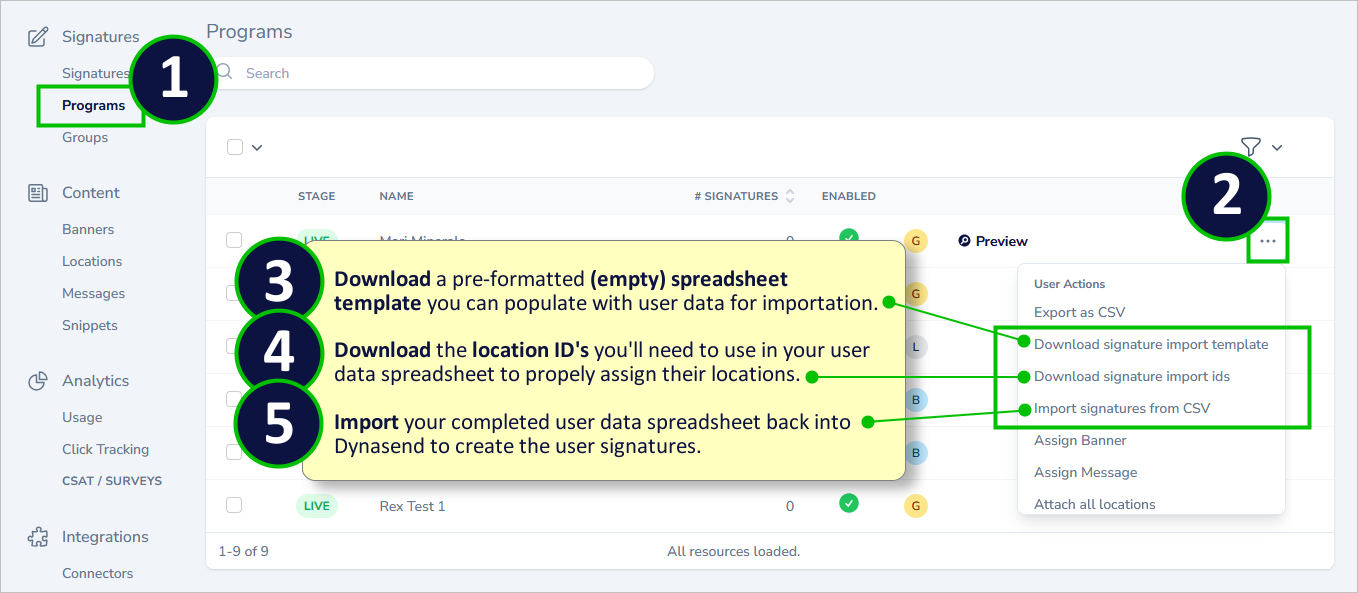
The same actions appear for developers on the program detail page. See data related program actions.
Prepare the CSV
- Keep the template column headers. Column order does not matter.
- Every row needs a valid email. The email must belong to this account and this program (or be new to Dynasend).
- Fill only the columns you want to set. An empty cell leaves the existing value unchanged.
- Plain select fields (for example a Role dropdown) use the option ids from the form, not the display labels.
- Save the file as CSV (not Excel
.xlsx).
Locations, banners, messages, and CSAT
When the program form includes a location, banner, or signature message field, the template includes that column. If your account has CSAT configs, the template also includes csat_config.
Those columns expect a pretty ULID (for example location_01h…), not a city name, and not a numeric id. Use Download signature import ids to copy the correct values:
| Column | Value to paste | Rules |
|---|---|---|
location | location_… | Must be attached to this program |
banner | banner_… | Must be an active banner on the account |
signature_message | sig_msg_… | Must be an active signature message on the account |
csat_config | csat_config_… | Must be a CSAT config on the account |
Do not import the same roster from the Locations screen. Keep one CSV per program and set location on each row when offices differ.
What the import does
- Creates a signature when the email is new to Dynasend for this account and program.
- Updates an existing signature in the same program when the email matches.
- Leaves fields unchanged when a cell is empty.
- Stores form text and select values in signature metadata; stores location, banner, signature message, and CSAT as foreign keys from pretty ULIDs.
- Rejects numeric ids for relation columns, inactive banners or messages, and locations that are not attached to the program.
After you upload
Dynasend queues the import and sends a dashboard notification when it finishes. If some rows fail, the notification can include a link to a failures CSV with the row, email, and error.
The import does not create locations, banners, or CSAT configs. Create and attach those first, then paste their pretty ULIDs into the CSV.